
Group Membership Deviation (Z-Score)
What is a Z-Score
Z-Score Formula
A Z-Score measures how far a value deviates from the mean, expressed in standard deviations:
Z = (Account Group Count − Mean) / Standard Deviation
A higher Z-Score indicates that an account belongs to significantly more groups than average, which may signal excessive access or a potential security risk.
Threat Rule: Group Membership Deviation (Z-Score)
The Group Membership Deviation (Z-Score) threat rule detects accounts with group membership outside the standard distribution for accounts. It allows the selection of a min/max Z-Score and a min/max Mean group membership to identify potential outliers for account group membership on a platform. Customers should customize the default rule to fine-tune the min/max values as required for their organization.
Default Parameters
| Parameter | Default Value | Description |
|---|---|---|
| Min Z-Score | 3 | Minimum number of standard deviations above the mean to flag (3 = 99.7th percentile) |
| Max Z-Score | — | No upper bound by default |
| Min Average Members | — | No minimum mean group count by default |
| Max Average Members | — | No maximum mean group count by default |
| Score | 5 | Points contributed to the Account Statistics category |

Compliance Framework
This rule maps to NIST CSF V2.0 / PR.AA-05 (Access Management).
Interpreting Results
Worked Example
An account belongs to 20 groups on a platform where the mean is 8 groups and the standard deviation is 3 groups:
Z = (20 − 8) / 3 = 4.0
This Z-Score of 4.0 exceeds the default threshold of 3, so the rule flags this account and contributes a score of 5 to the Account Statistics category.
What the Z-Score Values Mean
| Z-Score Range | Interpretation |
|---|---|
| < 2 | Within normal distribution; unlikely to be flagged |
| 2–3 | Above average; may warrant review depending on threshold |
| 3–4 | Significantly above average; flagged at default settings |
| > 4 | Far outside normal distribution; strong outlier |
Customizing Thresholds
Tuning Guidance
- Lower Min Z-Score → more sensitive detection, more accounts flagged, potentially more noise
- Higher Min Z-Score → less sensitive detection, fewer accounts flagged, less noise
- Set Min/Max Average Members → exclude platforms with very small or very large average group counts, which can produce misleading Z-Scores
Start with the default Min Z-Score of 3 and adjust based on the volume of flagged accounts in your environment.
Report: Account Z-Score
Navigate to Search Library | Detections and select Account Z-Score.
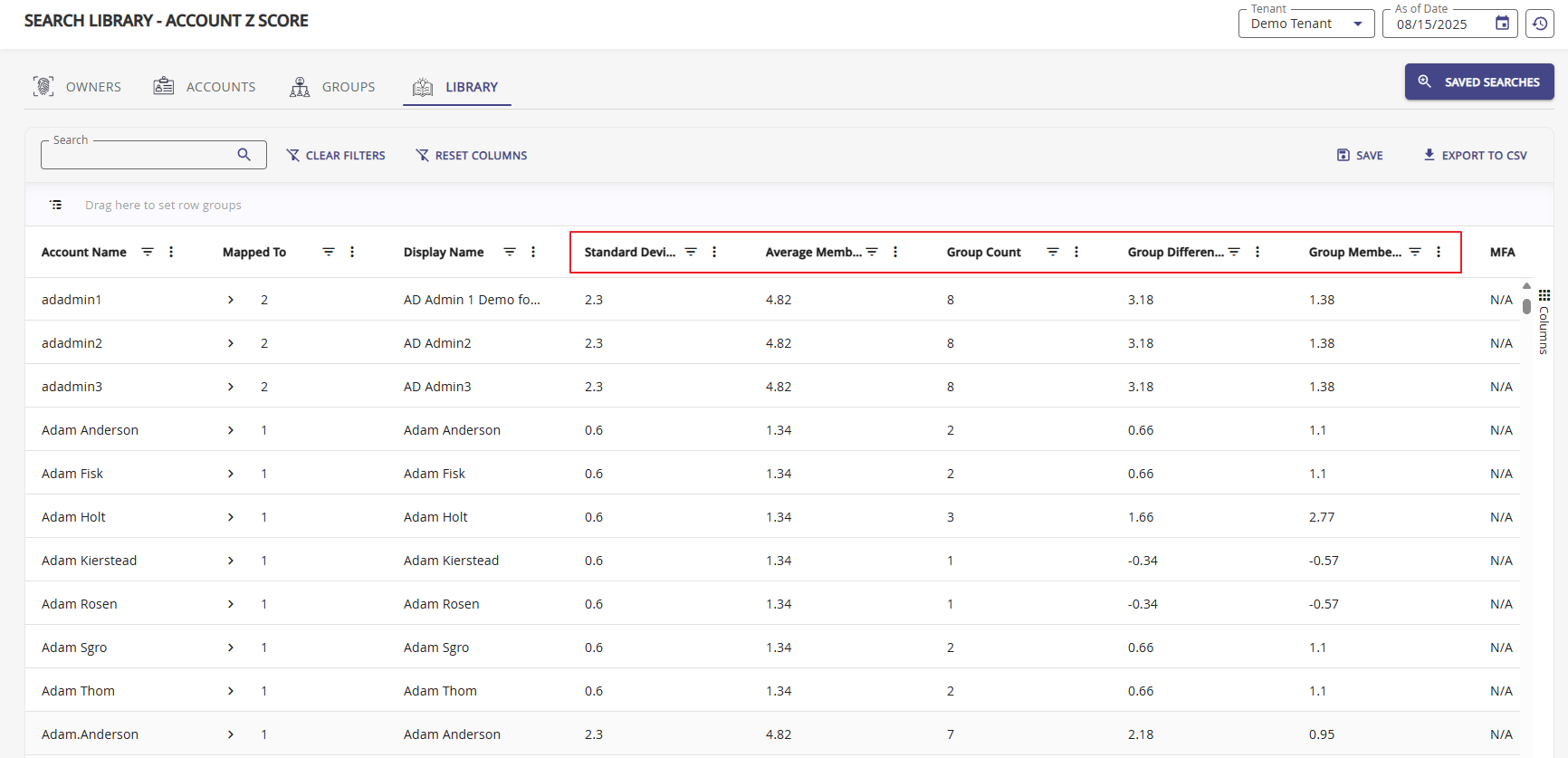
The Account Z-Score report displays the calculated mean (Group Membership Z-Score) and standard deviation values. Using the filter options, organizations can search for specific ranges to identify accounts that pose a threat. The higher the Z-Score, the higher the potential threat.
Use the Columns config to manipulate your table grid. Each column provides filter and sorting options.
Report Columns
| Column | Description |
|---|---|
| Standard Deviation | The standard deviation of group membership counts across all accounts on the platform |
| Average Member Count | The mean number of groups per account on the platform |
| Group Count | The actual number of groups this account belongs to |
| Group Difference | The difference between this account's group count and the platform mean |
| Group Membership Z-Score | The calculated Z-Score value for this account |